Microsoft Foundry
Back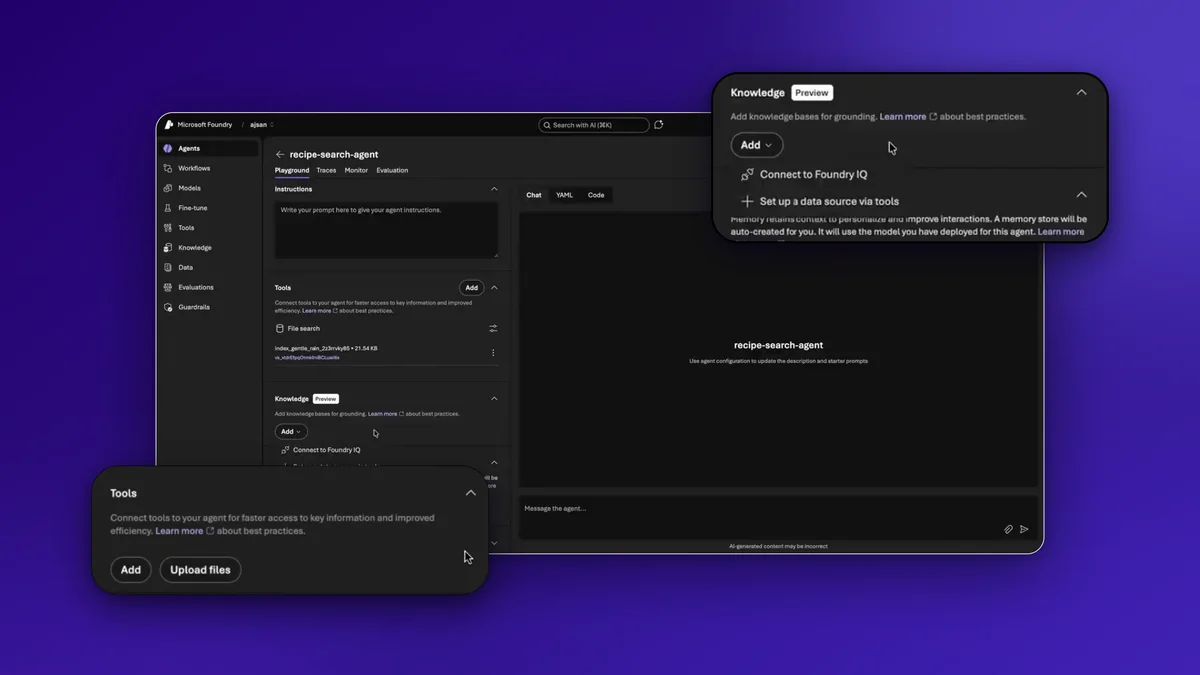
Testing how students build AI agents with their own data in Microsoft Foundry.
Details
- RoleStudent UX researcher, moderator
- TimelineJan. - Mar. 2026
- SoftwareMicrosoft Foundry, Dovetail, Figma
- TeamHeidi Ly, Charlotte Truong, Jasmine Sayed
Overview
[1]Can students build an AI agent with their own data?
In my master’s program, we were fortunate enough to get a lot of industry sponsors for usability testing sessions on their products, as part of a usability testing class: HCDE 517, Usability Studies, at the University of Washington. Microsoft was my team’s sponsor, and we were tasked with seeing how university students interacted with their AI platform, Microsoft Foundry, and specifically their thought process when uploading data to the platform to create an AI agent.
Over 10 weeks, from January to March 2026, my team of four worked with Microsoft’s CoreAI Knowledge & Data team, investigating Foundry’s data-integration workflows for students and startup founders. I moderated six of our eight usability sessions and contributed to every part of the study, from the testing protocol to our final presentation to Microsoft.
Microsoft Foundry
[2]What is Foundry?
Microsoft Foundry (formerly Azure AI Studio) is a unified, enterprise-grade AI platform for building, deploying and managing AI applications and agents. We focused on its Agent Playground, where you set up an agent’s instructions, tools, knowledge and guardrails, then message the agent to test it.
- Tools add ready-to-use APIs to an agent, to analyze documents, turn speech into text or automate entire workflows. It’s also where you upload data to the agent.
- Knowledge connects an agent to external data sources and grounds it in them, like SharePoint, Azure AI Search and Foundry IQ.
- Guardrails keep an agent safe and secure from unwanted prompts, like harmful or illegal content.
What we were looking to learn
Our sponsor is part of the Knowledge & Data team for Foundry. To make the most impact, what they really wanted to know centered on how students upload data to the agents they create. When students are making an agent and want to add data to it, what is their mental model? Which part of the interface do they gravitate towards?
At the time, the Tools tab was where users could upload data, with an Upload files button. Was this the right place for it?
How we tested
[3]A recipe agent for a baker
We recruited participants with a Google Form screener, shared through UW Slack channels. We got 13 responses and ran 8 sessions, with students from software engineering, early-stage startup and data analysis backgrounds.
Who we tested
We looked for active students with a computer science, technical or startup background, who were curious about AI, looking to use it for a project and had worked with datasets before.
Each participant got the same scenario:
“You are a developer looking to help a baker with optimizing their recipe website’s search function with an AI agent. You are using Microsoft Foundry to create an agent that is familiar with their recipes, based on the existing recipe data you have.”
Tasks
- Start creating an agent.
- Personalize the agent with the given recipe data, including uploading local files.
- Publish and share the agent.
After each task, participants rated how easy or difficult it was on a 1 to 5 scale. Sessions were in person on the UW campus, with one moderator and one notetaker, a macOS laptop, prepared recipe files and a Foundry account with onboarding already set up. We used the Think Aloud protocol throughout, and rated each finding on Nielsen’s severity scale, from 0 (not a usability problem) to 4 (catastrophe).
Synthesis in Dovetail
We synthesized our findings in Dovetail, which helped us spot trends across the session recordings and transcripts. Its AI synthesis was super helpful, but it wasn’t perfect!
When the protocol broke
[4]Work around the bug, or let it happen?
My teammate and I ran our team’s very first testing session. Everything was going according to plan until something totally unexpected happened. The participant ran into a bug with the agent’s guardrail functionality, which kept them from creating an agent. It hadn’t come up while we were developing the protocol.
My teammate believed we should go around it and fix it for participants when they reached that part of the protocol. In class, we were taught not to deviate from the protocol a team finalizes beforehand, to keep results consistent across participants. That did make sense to me. But I believed this was a situation where adapting on the fly would give us valuable insights, since it was an organic usability problem that would definitely come up for other students using Foundry.
So I proposed that participants experience the guardrail issue organically, so we could see what they would do, and that we add it to our protocol. Whether or not they could solve it on their own, both outcomes would be valuable to our sponsor. If students couldn’t get around it, that would be catastrophic: it would turn them away from the platform completely, which is exactly the opposite of what Microsoft wants. After I explained my perspective, my teammate agreed.
Severity 4: Catastrophe
It was indeed catastrophic. None of our 8 participants could create an agent, because the guardrail blocked their interactions. The default guardrail wasn’t assigned, so agents were tagged to the wrong version, and no one could move forward.
“I don’t know what this is, I got somewhere else altogether.”
Our recommendation: Foundry should automatically assign Microsoft’s default guardrail when an agent is created.
Tools or Knowledge?
[5]Not just whether, but why
As the one running most of the sessions, I needed to understand not just whether participants struggled with uploading their data, but why they were struggling. Writing down “they were confused with this part” wasn’t going to give our sponsor anything actionable.
So I really pushed the Think Aloud protocol when participants reached the data upload step, where they’d have to use the Tools and Knowledge tabs. I asked probing follow-up questions in the moment, and had participants narrate what they expected to find and where, rather than just letting them click around silently.
Severity 3: Major
Thanks to that probing, we found that participants gravitated towards the Knowledge tab as the home for their data, but the real upload function was under Tools. 6 out of 8 participants hit the exact same confusion. They went to Knowledge first and were confused to only see existing Microsoft data sources, and when they found Upload files under Tools, it didn’t feel like where data should live. Behind it was a mental model that nearly all of them shared.
“I think that the Knowledge is where I want to put in the... Oh, connect to Foundry IQ...? I feel like the knowledge is where I want to put in the recipes [data] rather than tools.”
Other participants said the same:
- “I feel like upload files should be under knowledge though. I’m gonna try adding it in tools because I’m confused here.”
- “So I was a bit confused about uploading the data because there’s tools and there’s knowledge ... I wasn’t sure if I’m supposed to add it in the upload files or in the knowledge for the agent.”
None of them rated uploading their data as very easy. 4 out of 8 rated it a 3 out of 5, and 1 rated it a 4 out of 5 (difficult). In our final presentation, we recommended that Microsoft move Upload files to the Knowledge tab, and explain the difference between Tools and Knowledge in simpler language.
More findings
[6]Many more findings...
We found four smaller issues too, each a Severity 2 (minor):
- Agent instructions: 3 out of 8 participants weren’t sure whether the Instructions field or the Message agent box was for building the agent or for testing it.
- A cluttered landing page: 4 out of 8 weren’t sure whether to begin with Start building or Coding quick start.
- Not enough context: participants wanted onboarding or a tutorial to understand the platform’s terms.
- A confusing error: all 8 saw an error message after uploading their files, even when the upload worked.
What worked well
Publishing: 5 out of 8 participants rated publishing their agent a 1 out of 5 (very easy). One said it was “pretty straightforward and aligns with what I would expect it to do because it’s very similar UI elements to what other tools do right now.”
So what?
Despite the usability issues, all 8 participants were ultimately able to complete the scenario, barring the guardrail error. But their post-task responses were neutral to slightly frustrated. Students can still succeed with Foundry, and there’s plenty of room for improvement. So that students leave Foundry feeling confident they can build, and don’t walk away intimidated, we recommended that the team align with students’ mental model of where their data should go, and consider a mini onboarding tutorial or tooltips in simple language for the Tools and Knowledge tabs.
Impact
[7]Beyond the scope of our class
We reported our findings to our Microsoft sponsor, who was surprised and thankful. They reported the guardrail issue to the Foundry engineering team right away, and engineers were assigned to fix it. We went back and forth with the engineering team, giving them the information they needed to reproduce the issue and get to its root cause.
Our sponsor also routed our findings to several other designers in the relevant areas. Our scope was limited to Tools and Knowledge, but our work reached other areas of Foundry too.
This felt really fulfilling. The class was meant to be field practice with a real sponsor, getting our hands dirty, but we ended up making a genuine impact on a real product used by many people worldwide. And we’re just students! It reminded me how satisfying it is to solve real user problems, and why I fell in love with UX in the first place.
Reflection
[8]What I would do differently
Over-recruit for scheduling
Two participants rescheduled at the last minute, on the same day as their sessions. That pushed us past our planned testing window, and we needed an extra day of testing to meet our minimum. Next time, I’d over-recruit by 1 to 2 participants to account for last-minute dropouts.
Keep one moderator
We took turns moderating as a learning experience. But with multiple moderators, prompts and follow-up questions may have varied slightly between sessions, which could affect the consistency of our findings. Next time, we’d stick to one moderator.
Check default states early
The guardrail feature had only recently been introduced, so we didn’t account for how its inheritance logic would block users. Next time, we’d validate new system constraints earlier.